You build your business.
We keep it in line.
ItemLine is the all-in-one system for businesses that buy, sell, deliver or make things to order. Orders, inventory, invoices, clients, quotes, scheduling and your team's time clock all live in one place instead of five different apps.
14-day free trial on paid plans (one per person) · cancel any time · Connect is free
Your business shouldn't live across a dozen different tools.
One system. Every side of the business.
ItemLine is built for both sides of a sale: the business buying product, and the business selling it. Whichever side you're on, the same system runs the whole operation, and if the business on the other end of the relationship is on ItemLine too, that connection is already built in.
For distributors and wholesalers
Everything you need to manage clients, run the route and get paid.
- Know every client at a glance: visits, balances and who has gone quiet
- Send professional invoices in seconds, built from your own catalogue
- Plan delivery routes stop by stop, with a live map of every client
- Let retailers order from your live catalogue, with no price list to text out
- See exactly who owes you what, and give clients their own portal
For retailers
Everything a store needs to stay on top of what it buys and what it has.
- Scan or snap a vendor invoice and the items fill themselves in
- Order from your distributors in a few taps, no phone calls
- Get warned before stock expires or a supplier changes a price
- See purchases, returns and expenses in one place
- A daily Business Health score built from your real numbers
For studios and made-to-order shops
Embroidery, print, signs, photography, catering and custom work.
- Send quotes customers approve online, no account needed
- Run every job through stages you name yourself
- Share proofs, take deposits and bill straight from the job
- Let customers book a free time on your calendar
- Know what each job really earned, after materials and time
And when a retailer buys from a distributor who's also on ItemLine, the two sides are already linked, so the same order shows up as a sale on one account and a purchase on the other, with nothing to re-enter.
Who is ItemLine for?
If you buy, sell, deliver or make things for customers, and you are tired of juggling apps, spreadsheets and sticky notes, this was built for you.
Stores
Track what you sell, who you buy from and what is about to expire, and order from your distributors without the phone calls.
Retail planWholesalers
Invoices, a client list, visits and a catalogue that retailers can order from on their own.
Wholesale planDistributors
Everything a wholesaler gets, plus delivery routes, a live client map and planning for the people who drive.
Distributor planImporters
Suppliers, purchase orders, stock and costs in one trail, then invoices and a catalogue for the people you sell to.
Wholesale planCustom apparel and embroidery
Quotes, proofs, deposits and jobs that move through stages you name, for every made-to-order job.
Studio planPrint and sign shops
Price the job, get the proof approved online, track materials and bill from the finished job.
Studio planPhotographers
Quotes, sessions with a shot list, forms and releases, and a download link for the finished work.
Studio planCatering and events
Quote the event, take the deposit, put the day on the schedule and send the final invoice.
Studio planAutomotive shops and detailers
Quotes, jobs, parts on the shelf and invoices, with each job moving through your own stages.
Studio planFlorists and bakeries
Take custom orders with a deposit, schedule pickup dates and keep your supplies counted.
Studio planHome services and trades
Quote the job, schedule the crew, track their hours and send the invoice from the same place.
Studio planWhere business
comes together.
HubLine is the B2B discovery layer built into ItemLine. Distributors publish a live catalogue; retailers browse and order directly. No phone calls, no text threads, no missed orders.
- Catalogues update in real time, so the price a buyer sees is never stale
- Orders route straight into the distributor's queue, not an inbox
- Free for any retailer to browse and order, forever
- Message any business on ItemLine by their email, even without a public profile
The pulse of
your business.
PulseLine is the AI built into ItemLine. Ask it anything, like overdue invoices, slow moving stock, client trends or delivery performance, and get a plain English answer instantly. It also watches on its own, and flags what needs you before it becomes a problem.
- Ask a plain English question, get a real answer from your own data
- Proactive alerts before a slow month becomes a bad one
- A single Business Health score built from every signal, updated daily
Your bank,
tied to your books.
Connect a business bank account and see your cash next to your invoices. When a deposit lands, ItemLine spots the invoice it pays. When money goes out, it is ready to become an expense. Every suggestion waits for your yes, and the connection is view only, so ItemLine can never move a cent.
- See what is in the bank without opening the bank, as a number on your dashboard
- Deposits that match an open invoice to the cent are suggested for it, and you confirm
- Spending that leaves the account is listed ready to add as an expense, with a category you choose
- Your bank login stays with your bank. The connection runs through Stripe, and you can disconnect any time
An optional add-on for paid plans: $12.99 a month for each connected account, US banks only. Read the bank linking FAQ
Example with made-up figures.
Let every client see their own invoices.
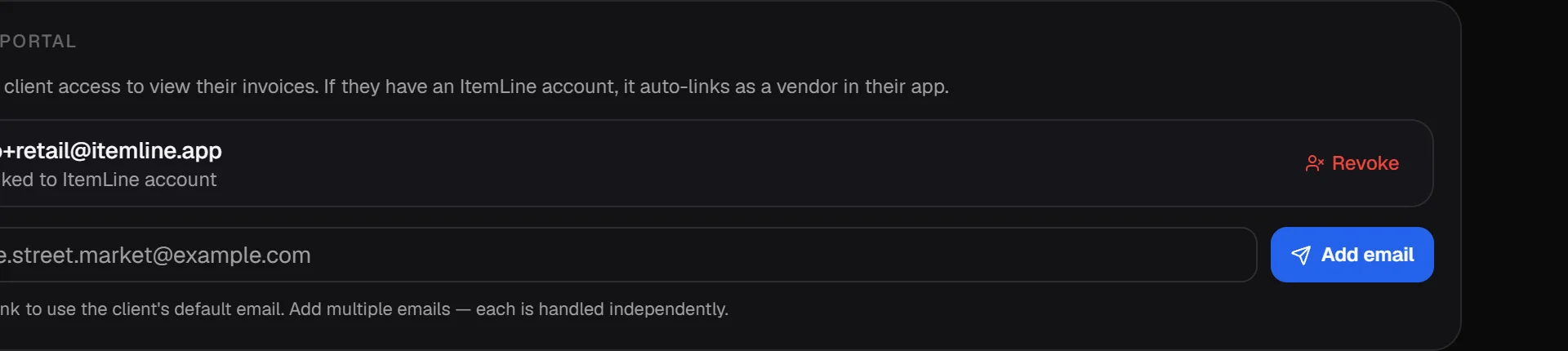
Invite a client by email from their profile. They see their invoices and your visits (and, for Studio customers, their quotes and jobs), and how they see them depends on whether they already use ItemLine.
Invite from the client profile
Add the client's email, tap Add email, and ItemLine works out the rest. You can add more than one email per client, and revoke access at any time.
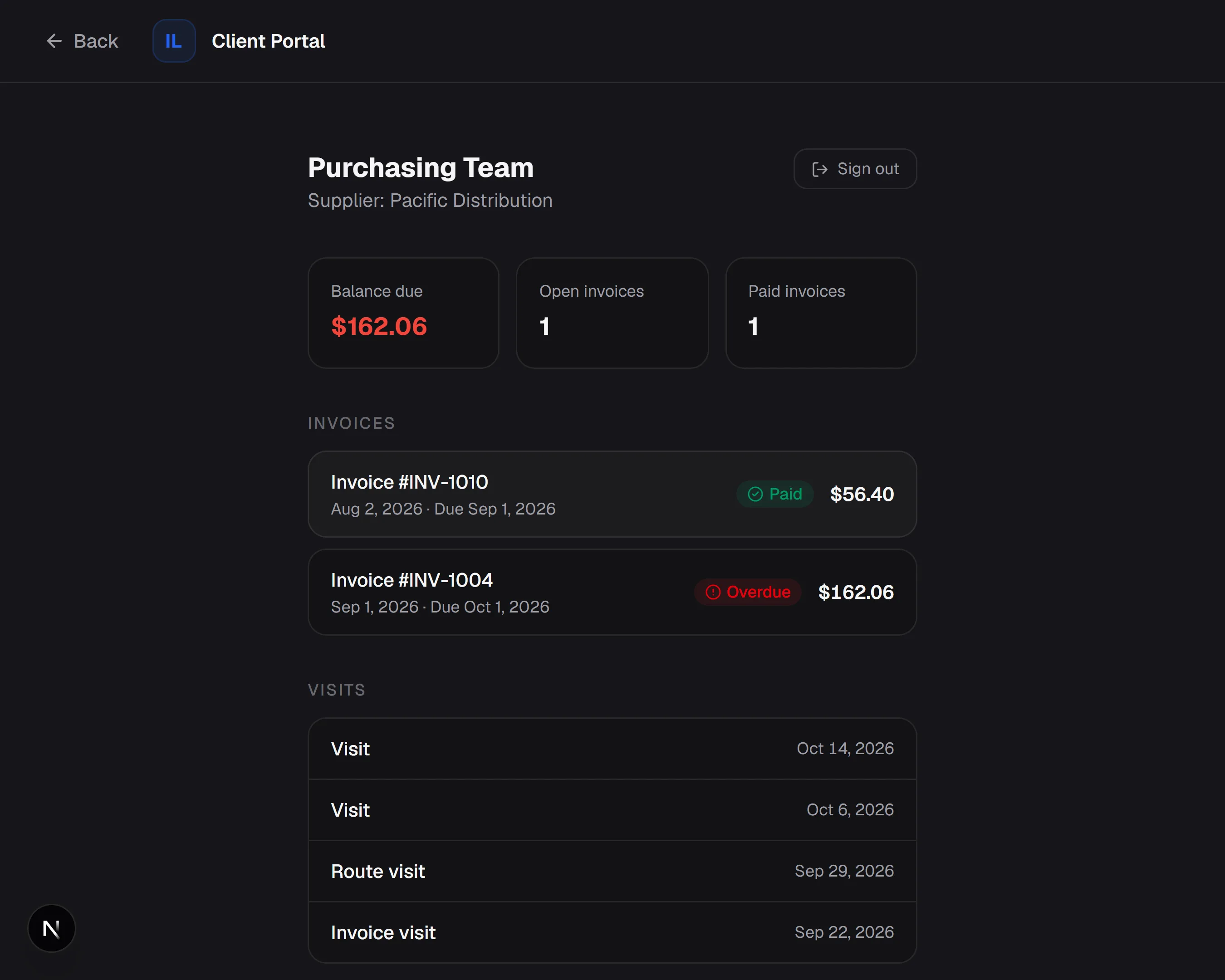
A web portal, no app needed
For retailers who don't use ItemLine. They only need an email address.
- They get an email with a secure setup link, valid for 72 hours.
- They choose a password and sign in at itemline.app/portal/login.
- They see their balance due, and which invoices are open, overdue or paid.
- They see when you've visited, and what kind of visit it was.
- They can open any invoice and print it or save it as a PDF.
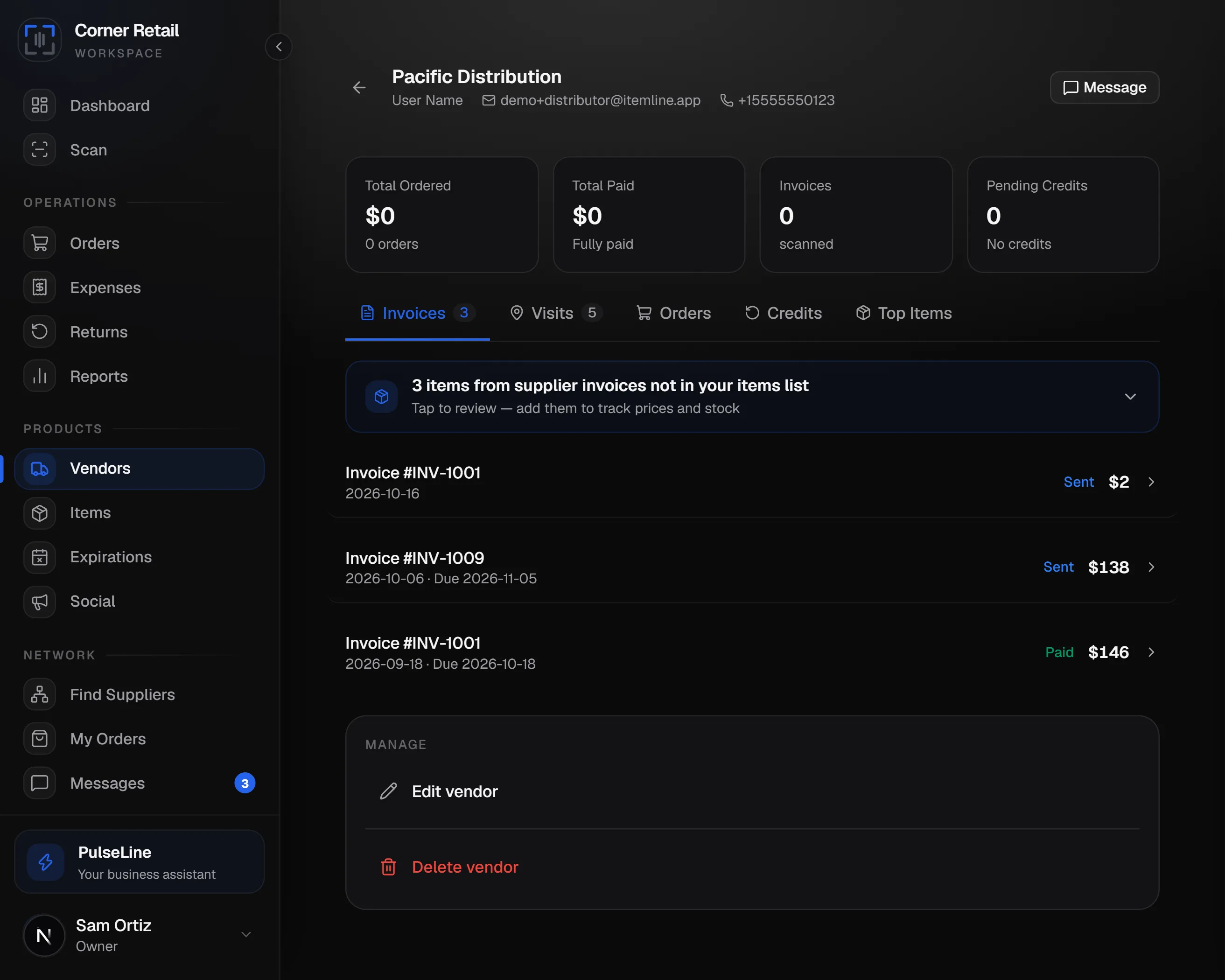
You show up inside their app
For retailers already on ItemLine. Matched by email, so there's nothing to set up.
- They're linked automatically when you invite the email on their account.
- You're added to their Vendors, with your invoices and visits on your vendor page.
- Items on your invoices that they don't carry are suggested to add.
- Price changes on what they buy from you are flagged for them.
Needs a Retail, Wholesale or Distributor account on their side.
The client portal is included in Wholesale, Distributor and Studio. Clients only ever see invoices you've sent, never drafts, and for visits only the date and type, never your notes. Screens show demo data.
Everything that keeps the day moving.
Beneath HubLine and PulseLine is the everyday machinery: the tools you actually touch between opening and closing.
Barcode scanning
Scan with your phone's camera to add stock or build an order. Tap the picture to focus, use the zoom and light when you need them, or just type the number. Every barcode format is recognized as the same product, so scanning never creates an accidental duplicate.
Route planning (Distributor)
Plan a delivery route, save it for a future day, or spread a batch of overdue clients across the week by area automatically. Reminders go out to whoever's driving.
Invoicing & payments
Branded invoices built from your catalogue, recurring billing on a schedule, and drafts that never touch your inventory until they're actually sent.
Team & permissions
Give each teammate exactly the access they need: view, add, edit, or delete, per area of the app. PIN login works for a shared device.
Real notifications
Push alerts on every device when an invoice is paid, an order comes in, stock runs low, or a route is about to start.
Time clock & schedules
A shop tablet where everyone clocks in with their own PIN, a team schedule you can set months ahead, shift trades a manager approves, and time off requests.
Quotes, jobs & proofs
On the Studio plan, price work, get it approved online, run it through your stages and bill it from the job with the deposit taken off.
Messaging that finds anyone
Message a supplier or client with photos and files. Know a business's email? Type it and reach them even without a public profile. Strangers arrive as requests you can accept, ignore or block.
Photos on every item
Up to 10 photos per item show as thumbnails in your list, then come along in one step when you add the item to your catalogue. Sync it again whenever the item changes.
Scan long receipts
Add every page of a long invoice or receipt, put them in order and read them together as one expense. Scan a barcode to log a return in one step.
Switch accounts
Keep several accounts signed in on one device and move between them in a tap. Off by default on the web, so a shared computer never keeps yours.
A dashboard that reads like a report
Pages for the parts of your business, a week, month, quarter or year switch, and a plain-English summary with your Business Health score on top. Tap the edges of the revenue chart to page back through earlier weeks or months. Arrange and resize every card on a computer, and each person on your team keeps their own layout.
Make it look like yours
Pick your accent color and a background, add a live moving background if you like, and turn on glass cards. Aurora, silk, constellation, lava, fireflies, rain, waves, grid and embers all stay still for anyone who has reduced motion turned on.
QuickBooks & Drive
Every invoice syncs to QuickBooks Online automatically, and a PDF copy saves itself to your own Google Drive along with your expense receipts, with no exporting and no manual backups.
Questions, answered.
What's included in the free trial?
Paid plans start with a 14-day free trial with everything in the plan you pick. A card is required to start it, you pay nothing for 14 days, and you can cancel any time before it ends. The free trial is offered once per person: if you've already used one (even on an account you later deleted), you pay when you subscribe. Connect is free and never needs a card. See the Terms and Refund policy for billing details.
Can I change plans later?
Yes, any time from Settings, then Subscription, and it takes effect right away. Moving up charges the difference for the rest of your billing period; moving down takes the unused value off your next payment as a credit. Your data, team and settings stay with your account.
Who is HubLine for?
Distributors publish a catalogue; retailers browse it and place orders. Any account, including the free Connect plan, can browse and order. Publishing a catalogue, with photos, categories and your own branding, is part of the Wholesale, Distributor and Studio plans.
What is the Studio plan?
Studio is for businesses that make or do things to order, such as embroidery, printing, signs, photography and catering. Send a quote, get it approved online, run the job through your stages and bill it with the deposit taken off. It also includes everything in Wholesale, plus online booking so customers can pick a time from a link. It is in beta right now, and beta pricing may change.
Can I link my bank account?
Yes, as an optional add-on on paid plans. It is view only, so ItemLine can see your balance and recent transactions but can never move money, and your bank login stays with your bank. Deposits that match an open invoice and spending you can turn into expenses are suggested, and you confirm each one. It is $12.99 a month for each connected US account.
Is there a mobile app?
ItemLine runs in the browser and as an app on iPhone and Android, all on the same account.
Do I need QuickBooks or Google Drive?
No. They're optional. QuickBooks sync and Google Drive backup need your own accounts with those services, and ItemLine is not affiliated with or endorsed by Intuit or Google.
How accurate is PulseLine?
PulseLine is an AI assistant and can make mistakes. Treat its answers as a starting point and check anything important against your own records.
Can my team use it?
Yes. On paid plans you can add teammates, choose what each can view or change, and let them sign in with a PIN on a shared device.
Where do I get help?
Email support@itemline.app or use the contact form. We typically reply within one to two business days, and the contact form (or Settings, then Support, in the app) is the fastest way because it goes straight into our ticket system.
Up and running the same day.
Create your account
Pick the plan that matches how you work and start your 14-day free trial. It takes a couple of minutes, and you can change plans any time.
Add your products and clients
Type them in, scan barcodes with your phone, set up your services, or order from a distributor on HubLine.
Run the day from one place
Invoice, plan routes, track stock and watch your dashboard and Business Health score update as you work.