Check out what you get with ItemLine.
Retail gives you inventory, vendors, purchase orders, expenses and returns in one place, plus a direct line to your distributors on HubLine. No POS required.
Retail
For stores that buy from vendors and want to stay on top of what comes in, what it cost and what is on the shelf.
14-day free trial. A card is required to start, and you can cancel any time before it ends.
Sound familiar?
Be honest: how many of these sound like your week?
- Do your vendor invoices pile up in a drawer until someone has time to type them in?
- Do you find out an item is expiring when you smell it, not before?
- Did a supplier change a price and you only noticed at the end of the month?
- Does ordering mean phone calls, texts and a notebook by the register?
- Are you ever unsure how many of something is actually on the shelf?
- Have you paid the same invoice twice, or forgotten to pay one?
- Do you dread tax time because the receipts are everywhere?
- Did you send goods back to a vendor and never get the credit?
- Does one person in the store hold all the passwords and the know-how?
- Do you wish you could see the month's spending without opening three apps?
Nodded at even one? Retail was built for you.
Every distributor on your phone, with today's prices.
Sam used to start Monday with calls and texts to find out what each rep had this week. With HubLine, distributors publish their catalogues and Sam browses them like a shop, then sends the order in a few taps.
Monday, 7:42 a.m.
Three voicemails, two PDFs and a text that says "new prices soon". That is how the order used to get placed.
See who they are before you order
Every distributor has a public profile: where they deliver, their minimum order, how fast they reply and what they sell. Open it, browse the catalogue and save the ones you use. Every account, including yours, can browse and order.
Browse a live catalogue, then see each product properly
Products are grouped into categories you can search and sort. Tap one to see it large, swipe through its photos, read the full description and add it to your order. Tap a photo to zoom in.
Send the order, then follow it
Build an order from a distributor's catalogue and send it to them. It arrives in their incoming orders queue, and every order you have placed sits in one list with its status, so you can follow up or reorder in seconds.
Talk to them without leaving the app
Message a supplier, with photos and files, and tie a thread to a specific order. If a distributor is on ItemLine and linked to you, their invoices even arrive in your records on their own.
Everything in HubLine: 5 features
Browse live catalogues
Search the network for distributors and browse the catalogues they've published, with the prices and availability they currently show.
Order directly in the app
Build an order from a distributor's catalogue and send it to them. It arrives in their incoming orders queue.
Order history and tracking
Every order you've placed in one list, with its status, so you can follow up or reorder.
Messaging
Chat with suppliers and clients inside the app, including threads tied to a specific order, and send photos and files. If a vendor and a client are both on ItemLine and linked, either side can message the other without needing a public profile.
Message anyone by email
Type the exact email address of any business on ItemLine to message them, even if they have no public profile. A first message to someone outside HubLine arrives as a request they can accept, ignore or block. Blocked senders are told the business can't see their messages.
Know what is on the shelf, what it cost, and what is about to expire.
Sam wants three answers without opening a spreadsheet: what do I have, what did it cost me, and what is running out of time. Retail keeps all three current as you add items, receive stock and log what comes back.
Before you open the shutters
The stockroom talks to you first, so the shelf never surprises you.
An item list you can actually read
Every item shows its photo, cost, price and how many you have, in one searchable list. Add up to 10 photos per item from your camera, library or files. Prefer to keep a plain product list? Turn stock counting off and your numbers stay safe.
Add an item in seconds, with its expiry
Scan a barcode with your phone, or type the item in. Mark it as expiring, pick the date, and it is logged in your Expiration Tracker automatically, with a warning before it becomes a loss.
Watch the dates before they cost you
See what is about to expire, grouped by how soon, and choose how far ahead you want to be warned. Change a date on an item and the tracker follows.
Order from your vendors without picking up the phone
Keep every vendor's details in one place and create purchase orders that move from draft to placed to received. Every order gets a proper number, like PO-2026-0001, that starts again each year.
Let the paperwork type itself
Photograph a supplier invoice, or every page of a long one, and the line items are read into your records. Review before you save. When a supplier on ItemLine sends you an invoice, it shows up in your Expenses already filled in, and stays in step if they change it.
Catch price changes and track what goes back
Get flagged when a supplier's price on something you buy changes. Log goods you send back to a vendor, scan a barcode to start the return, and track the credit you are owed.
Everything in Inventory and buying: 14 features
Item catalogue
Products with cost, price, category, tags, barcode, and quantity on hand, plus an internal notes field.
Item photos
Add up to 10 photos to an item from your camera, photo library or files. The first is the main one and shows as a thumbnail in your items list.
Track stock on or off
Keep counts, or just keep a product list. Switching counting off never loses the numbers you already have.
Invoice descriptions
Give an item a description once and it prefills on every invoice line you add it to. You can still edit it per invoice.
Barcode scanning
Use your camera to look up or add items. Tap the picture to focus, and when your camera supports it use the Focus, Light and Flip buttons and a zoom slider. You can also type a barcode number. UPC-A, UPC-E and EAN-13 codes for the same product are matched to each other, and a known item can have 1 added to its stock right from the scan.
Expiration tracking
Say an item expires when you add it, pick the date, and it's logged in the Expiration Tracker automatically. Choose how far ahead you want to be warned.
Vendors and purchase orders
Keep vendor details and create purchase orders that move from draft to placed to received. Every order gets a professional number such as PO-2026-0001 that counts up and starts again each year.
Supplier invoices become expenses
When a supplier on ItemLine sends you an invoice, it appears in your Expenses on its own: filled in, linked to their live invoice, and kept in step if they change it or record a payment.
Vendor invoice scanning
Photograph a supplier invoice and have its line items read into your records. Review before you save; scanning can make mistakes.
Multi-page receipts and invoices
Add every page of a long invoice or receipt from photos, files or a PDF, put them in order, and they are read together as one expense with the pages kept as one PDF.
Log a return by scanning
Scan a product's barcode and add it to a client return or a return to a vendor in one step, with its details filled in when it matches an item.
Price change alerts
Get flagged when a supplier's price on something you buy changes.
Vendor returns and credits
Log goods sent back to a supplier and track the credit you're owed.
Item analytics
Units sold, revenue, and a simple projection of when stock will run out, based on recent sales.
See where the money goes, month by month.
At the end of the month Sam wants to know what the store spent, with whom, and what is still open. Retail turns every stock purchase and everyday expense into a clear picture without a bookkeeper.
The last day of the month
No shoebox, no panic, no pile of receipts on the counter.
- 4:55 p.m.Every receipt is already attached to its expense.
- 5:00 p.m.Spending by month, category and vendor, in a click.
- 5:02 p.m.Laptop closed. On time for once.
Stock purchases and everyday expenses, separated
Track paid and unpaid spending with a receipt attached. Stock purchases and everyday expenses sit in separate sections, each with its own total. Filter by year and month and the total follows.
Spending and purchasing reports
See what the store spends by month, category and vendor, what you have ordered and what is still open, what vendors owe you in credits, and the value of what is on the shelf.
Everything in Expenses and reports: 2 features
Expenses
Track general business spending, with paid and unpaid status. Stock purchases and everyday expenses sit in separate sections, each with its own total. Filter by year and month and the Total follows.
Spending and purchasing reports
See what the store spends by month, category and vendor, what you have ordered and what is still open, what vendors owe you in credits, and the value of what is on the shelf.
Know how the business is doing before you check a single report.
Sam opens ItemLine in the morning and sees what matters: one score for how the store is doing, the two or three things pulling it down, and a link next to each one to fix it. No digging, no spreadsheets, no guessing.
Sunday night, one question
You ask in plain words. You get an answer, not a spreadsheet.
A daily Business Health score, with the reasons
A plain-English summary sits at the top of your dashboard with your Business Health score above it. Overdue payments, unpaid expenses, low stock and anything else that needs you show up below as a short Do next list, each with a link straight to the place to act on it. Everything is built from your own real numbers and refreshed daily, so it never goes stale.
Make the dashboard yours
The dashboard is split into pages for the parts of your business. Switch the whole thing between a week, month, quarter or year, and tap the edges of the revenue chart to page back through earlier ones. On a computer, choose how many cards sit in each row and how tall they are, then swap any card for another that fits. Every person on your team gets their own layout, and you can pick your own colors, a background and glass cards.
Tell people about it in a few taps
Pick a product or a promotion, generate a draft post and image, and review it before you publish. Create specials the same way and keep them in one place.
Everything in Insight and marketing: 5 features
Customizable dashboard
A dashboard split into pages for the parts of your business, with a plain-English summary on top. Switch between week, month, quarter and year, tap the edges of the revenue chart to page back through earlier periods, and on a computer rearrange, resize and swap every card. Each person on your team keeps their own layout, and you can hide menu items you never use.
Appearance
Choose light or dark, your accent color and a background, set how round the corners are, pick which shortcuts sit in your phone's bottom bar, add a live moving background (aurora, silk, constellation, lava, fireflies, rain, waves, grid or embers) and turn on glass cards. Live backgrounds stay still for anyone with reduced motion turned on.
Business Health
A daily score and a short list of what's dragging it down, such as overdue visits, unpaid expenses and low stock, each with a link to act on it.
Social posts
Generate a draft post and image for a product or promotion.
Specials
Create and manage promotional specials.
A teammate who answers at 11 p.m.
Sam has questions all day: how do I do this, what happened with that, who needs a nudge. PulseLine is the assistant built into ItemLine. Ask in plain English and it answers from your own business, so there is no hunting through menus and no waiting for someone to reply.
Sunday night, one question
You ask in plain words. You get an answer, not a spreadsheet.
Ask it the way you would ask a person
Which vendor invoices are still unpaid? What did we spend with Pacific Distribution this quarter? How do I log a return to a vendor? It knows your business and how ItemLine works, so you get an answer instead of a search page. It is an AI and can make mistakes, so check anything important.
Add things from a list, a file or a photo
Paste a list, upload a spreadsheet or photograph one, and PulseLine lays out what it found as cards with tick boxes. Untick anything wrong and add the rest in one go. Add a handful of vendors from a photo of their business cards, or a whole product list from a spreadsheet. Duplicates are flagged before they are added.
You stay in charge
Anything that adds or deletes is shown to you first, so nothing changes until you say so. Chats are private to each person on your team and clear on their own after 30 days.
Fair use, so it stays fast for everyone
Each account has a weekly usage allowance that your whole team shares, and it resets every Monday. PulseLine is included on every paid plan.
Everything in PulseLine: 1 feature
PulseLine assistant
Ask questions about using ItemLine and your business in plain language. It can make mistakes, so verify important decisions.
Run your crew without the clipboard.
The shop has a few people, and everyone needs to know when they work, what they can touch and who clocked in. Sam sets it up once: a tablet by the door for the time clock, a schedule you can fill months ahead, and a permission for each person on each part of the app.
Saturday, opening shift
Everyone knows where they are. Nobody sees what they should not.
- 8:00The team clocks in on the shared device.
- 8:05The cashier sees orders. The stockroom sees items. The books stay private.
- CloseThe hours add up on their own.
A time clock that fits on a shop tablet
Put a tablet at the shop. Each person picks their name and enters their own PIN to clock in, take a break and clock out. If you allow it, people can also clock in from their phone, and a punch from outside the shop network is flagged for a manager to check. There is no location tracking.
Schedules, trades and time off, handled
Set a shift once and repeat it on the days you choose, from a few weeks to a year. An employee can offer a shift to a coworker, the coworker agrees, and a manager approves before anything moves. Time off requests go to the same place.
Hours, overtime and pay, worked out for you
See each person's hours with daily overtime, double time and weekly overtime calculated from the rules you set, and export a pay summary. It is visible to owners and managers only.
Give each person exactly the access they need
For each area of the app, choose whether a teammate can view, add, edit or delete. Teammates can sign in with a PIN on a shared device. Protect your own sign-in with two-factor authentication, and switch between accounts on one device in a tap.
Everything in Team and security: 13 features
Employee directory
Your team members in one list with their role, pay rate and contact details, and who is clocked in right now.
Time clock
Clock in, take breaks and clock out on a shared shop tablet with a personal PIN, or from your own phone. Phone punches away from the shop network are flagged for a manager to check.
Team schedule and repeating shifts
See who works each day. Set a shift once and repeat it on the days you choose for as long as you like, from a few weeks to a year.
Shift trades with approval
An employee offers a shift to a coworker, the coworker agrees, and a manager approves before anything changes.
Time off
Employees request time off and managers approve or decline. Approved time off shows on the team's records.
Timesheets, overtime and pay
Hours per person with daily overtime, double time and weekly overtime worked out for you, and a pay summary you can export. Visible to owners and managers only.
Team permissions
Choose, per area of the app, whether a teammate can view, add, edit or delete.
Staff PIN login
Teammates can sign in with a PIN on a shared device.
Activity log
A chronological record of actions taken in the account.
Push notifications
Alerts on web, iPhone and Android, with each type individually switchable.
Switch between accounts
Keep several accounts signed in on one device and move between them in a tap. It is off by default on the web so a shared computer never keeps your account.
Two-factor authentication
Add a second step when you sign in, with recovery codes.
Multiple businesses
Run more than one business from one login. Your plan includes one; each additional business is billed by its own type, from $9.99 a month.
Your first 15 minutes
No big setup project. Here is the order most people follow, and every step has a short guide inside the app.
Add your business details
Your name and logo show on emails and documents. It takes a minute.
Add your first items
Type a few in or scan their barcodes with your phone. Add a photo if you have one handy.
Add your vendors
The suppliers you buy from, so purchase orders and invoices land in the right place.
Place a purchase order, or order on HubLine
Order from a vendor and track it until it arrives, or browse a distributor's live catalogue and send an order.
Scan a vendor invoice
Photograph an invoice and review the items that were read. You will not type one in again.
Add your team
Give each person their own access, and set up the shop tablet if you want a time clock.
Now see it for yourself
Everything above, as real screens from the Retail plan. Pick a screen from the list and switch between desktop and phone.
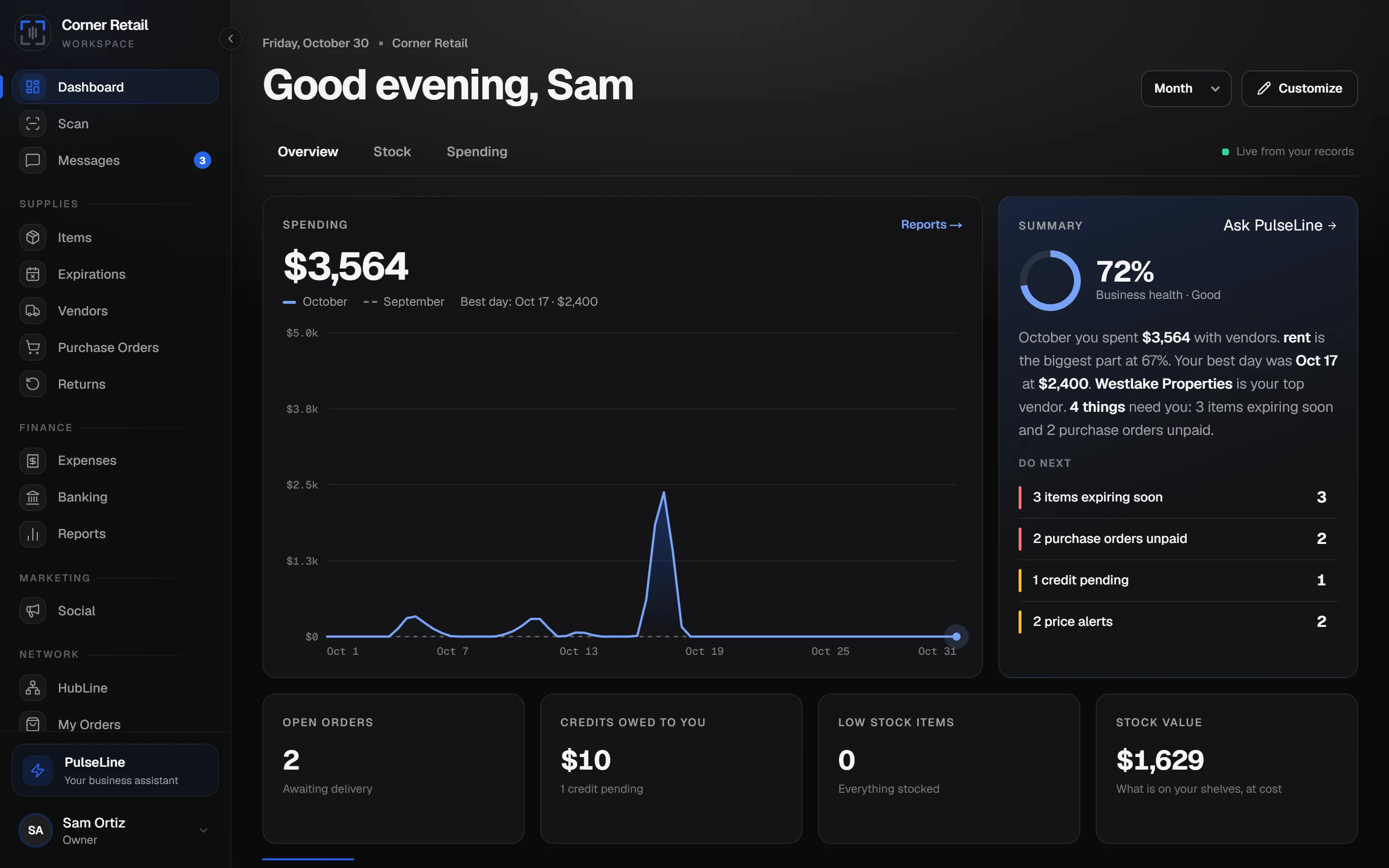
Your business as a report: a revenue chart, a plain-English summary with your Business Health score and what to do next, and the numbers you check most. Switch the period, move between pages and arrange the cards your way.
Screens show demo data and may differ slightly from your account.
Still have questions? Read the FAQ
Try Retail free for 14 days.
A card is required to start the trial. Cancel any time before it ends and you won't be charged.
Start free trialSam is an example business used to show how the plan works day to day. It is not a customer and the scenes are illustrations, not testimonials. Screens show demo data. Features, plan contents and pricing may change; the plan you select at sign-up is governed by our Terms of Service and Refund policy. Route distance and time figures are estimates, AI answers can be wrong, and scanned data should always be reviewed before you save it.