Check out what you get with ItemLine.
Connect is the free way into HubLine: find suppliers, browse their live catalogues, order in a few taps, and keep every conversation in one place.
Connect
Order from distributors on HubLine. Free forever.
Free forever. No card needed.
Sound familiar?
Be honest: how many of these sound like your week?
- Do you text a rep for the price list, then wait all day for a reply?
- Are your orders scattered across notes, group chats and voicemails?
- Can you remember what you ordered last time, or if it was ever confirmed?
- Have you ever ordered the wrong size because the price list was a photo of a photo?
- Do you find out something is out of stock after you have driven there?
- Are you opening soon and still collecting supplier numbers one at a time?
- Does every supplier send their catalogue as a different PDF?
- Would you like to try ItemLine's network before paying for anything?
Nodded at even one? Connect was built for you.
A supplier's whole catalogue, in your pocket.
Chris is opening a cafe next month and needs milk, cups, syrups and a hundred small things. Instead of calling three reps and waiting on three price lists, Chris opens HubLine, finds the distributors nearby and browses what they actually have today, with the prices they currently show.
Monday, 7:42 a.m.
Three voicemails, two PDFs and a text that says "new prices soon". That is how the order used to get placed.
Find the right supplier in seconds
Search the network for distributors and see where they deliver, their minimum order and their hours before you commit to anything. Save the ones you like and come back to them.
Browse a catalogue like a shop
Products are grouped into categories you can search, filter and sort. No PDF to download, no price list that went out of date last month.
Tap a product to see it properly
Open any product to see it large, swipe through every photo, read the full description and add it to your order. Tap a photo to zoom right in. Each product even has its own link you can share with a coworker.
Order in a few taps, and always know where it stands
Build an order from a distributor's catalogue and send it. It lands in their incoming orders queue, not an inbox, and you can follow every order you have placed in one list with its status, so you can follow up or reorder.
Keep the conversation where the order is
Message a supplier from inside ItemLine, including threads tied to a specific order, and send photos and files. Know a business's email? Type it and reach them even if they have no public profile.
Everything in Order on HubLine: 5 features
Browse live catalogues
Search the network for distributors and browse the catalogues they've published, with the prices and availability they currently show.
Order directly in the app
Build an order from a distributor's catalogue and send it to them. It arrives in their incoming orders queue.
Order history and tracking
Every order you've placed in one list, with its status, so you can follow up or reorder.
Messaging
Chat with suppliers and clients inside the app, including threads tied to a specific order, and send photos and files. If a vendor and a client are both on ItemLine and linked, either side can message the other without needing a public profile.
Message anyone by email
Type the exact email address of any business on ItemLine to message them, even if they have no public profile. A first message to someone outside HubLine arrives as a request they can accept, ignore or block. Blocked senders are told the business can't see their messages.
Know the moment something changes, and keep your account safe.
Chris does not want to keep refreshing a page to see whether a supplier replied. ItemLine tells you, on whichever device you are holding, and you choose exactly what is worth a buzz.
Between building the counter and hanging the sign
Your phone buzzes with the things that matter, and keeps quiet about everything else.
Alerts on web, iPhone and Android
Get a notification when an order moves, a message arrives or something needs a look, and switch each type on or off so you only hear about what matters.
A second lock on your account
Add two-factor authentication with an authenticator app and keep recovery codes in case you lose your phone. If you use more than one account, keep them signed in on one device and switch between them in a tap.
Everything in Alerts and security: 3 features
Push notifications
Alerts on web, iPhone and Android, with each type individually switchable.
Switch between accounts
Keep several accounts signed in on one device and move between them in a tap. It is off by default on the web so a shared computer never keeps your account.
Two-factor authentication
Add a second step when you sign in, with recovery codes.
Your first 15 minutes
No big setup project. Here is the order most people follow, and every step has a short guide inside the app.
Create your free account
Pick Connect, add your business name, and you are in. There is no card and no trial clock.
Find your suppliers
Open HubLine and search the network. Save the distributors you want to order from.
Open a catalogue and add products
Browse by category, tap a product to see it large, and add what you need to an order.
Send your first order
Review it and send. It arrives in the supplier's queue and appears in your order history.
Turn on alerts and two-factor
Choose which notifications you want and add a second step to your sign-in.
Now see it for yourself
Everything above, as real screens from the Connect plan. Pick a screen from the list and switch between desktop and phone.
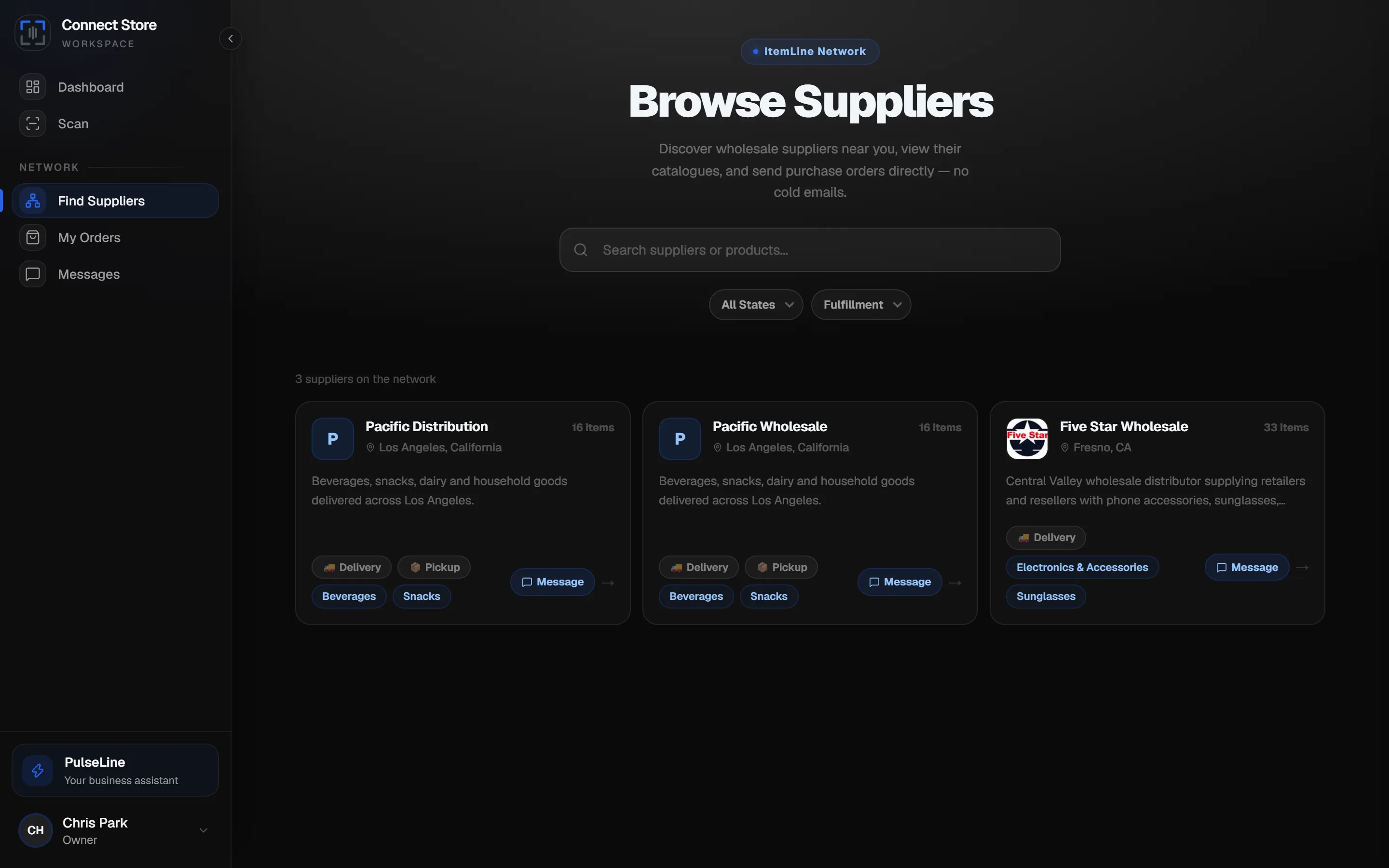
Discover suppliers on the network and browse their live catalogues.
Screens show demo data and may differ slightly from your account.
Still have questions? Read the FAQ
Start with Connect, free.
No card, no trial clock. Browse suppliers and place your first order today.
Get started freeChris is an example business used to show how the plan works day to day. It is not a customer and the scenes are illustrations, not testimonials. Screens show demo data. Features, plan contents and pricing may change; the plan you select at sign-up is governed by our Terms of Service and Refund policy. Route distance and time figures are estimates, AI answers can be wrong, and scanned data should always be reviewed before you save it.